
Last Updated: 6th April 2026
A friend mentioned a few months ago that his home insurance renewal had come in lower than expected. Not dramatically — but noticeably. When he queried it with his insurer, the answer was straightforward: he’d installed a smart doorbell the previous year and declared it on the policy. The insurer treated it as a security upgrade and adjusted the premium accordingly.
That conversation stuck with me. I’d been browsing smart doorbell cameras for a few weeks already — partly out of curiosity, partly because a parcel had gone missing from a neighbour’s step and the street had been talking about it. The insurance angle wasn’t something I’d considered when I started looking. It probably should have been the first thing I considered.
For a full picture of the tech upgrades worth making to a UK home from an energy and savings perspective, the Everyday Tech Savings Hub covers the broader list. This article focuses specifically on smart doorbells — what the insurance benefit actually is, how to make it work, and which models are worth buying.
Why Home Insurers Care About Smart Doorbells
Home insurance pricing is built around risk. The lower the assessed risk of a claim — theft, criminal damage, liability — the lower the premium tends to be. Smart doorbells reduce that risk in ways that insurers can quantify, which is why a growing number of UK providers treat them as a security upgrade rather than a gadget.
The mechanism works in a few distinct ways. A visible doorbell camera with motion detection deters opportunistic theft — the presence of a camera that’s obviously recording is enough to make a casual opportunist choose a different target. For insurers, deterrence reduces the probability of a claim occurring at all. That’s the most valuable outcome from their perspective.
When something does happen — a parcel theft, criminal damage, a dispute about whether a delivery was made — video footage from a doorbell camera changes the claims process significantly. A claim supported by clear footage of an incident is faster to process, harder to dispute, and less likely to result in a lengthy back-and-forth with the insurer. From the insurer’s side, that reduces administrative cost. From your side, it reduces the stress of proving what happened.
The discount itself varies by insurer and by the quality of the setup declared. Some UK providers offer a reduction on contents or buildings insurance when a verified smart security device is installed and declared. The reduction is rarely transformative on its own — but combined with the practical benefits of having the footage, the total value of the device becomes more interesting than the purchase price alone suggests.
If you’re thinking about building a more complete home security and energy setup rather than just the doorbell, the smart sensors worth knowing about covers leak detectors, draft sensors, and devices that catch problems before they become expensive — useful context alongside any security upgrade decision.
One important point: the discount only applies if you declare the device. When renewing or switching home insurance, declaring a smart doorbell as a security upgrade is worth doing explicitly — don’t assume the insurer will ask or that it’s automatically factored in.
What Makes a Doorbell Camera Actually Useful for Insurance Purposes
Not every smart doorbell delivers what an insurer needs to treat it as a meaningful security upgrade. The features that matter for insurance purposes are specific.
Video quality needs to be HD as a minimum — 1080p or above. Footage from a low-resolution camera that can’t clearly identify a face or read a vehicle registration plate has limited evidential value. Most current models at a reasonable price point meet this threshold. If you’re unsure whether a device is genuinely worth the investment or just marketed convincingly, how to spot smart gadgets that promise savings but don’t deliver covers the red flags to check before buying any smart security or energy device.
Motion detection is arguably more important than the doorbell function itself for security purposes. A camera that only records when the button is pressed misses the majority of events worth recording. Motion-triggered recording captures activity whether or not anyone rings — which is when most theft and criminal damage actually occurs.
Storage determines whether the footage is available when you need it. Cloud storage keeps footage accessible remotely and protected from physical damage or theft of the device itself. A smart doorbell with local storage avoids subscription costs but means footage is only accessible if the device is physically intact. For insurance purposes, cloud storage is more reliable as evidence — if the doorbell is stolen during an incident, locally stored footage goes with it.
Night vision matters because most doorstep theft happens in low-light conditions. Early morning deliveries, evening hours, winter afternoons when it’s dark by 3:30pm in Scotland — a camera without infrared night vision produces footage that’s effectively unusable after dark, which is precisely when you’re most likely to need it. A doorbell camera with night vision is non-negotiable for UK conditions.
App alerts allow you to respond in real time — which can prevent an incident escalating — and create a timestamped record of when you were notified, which is useful in a claims context.

Three Smart Doorbells Worth Buying
Ring Battery Video Doorbell Plus
The Ring is the most widely recognised smart doorbell brand in the UK and the model most likely to be familiar to an insurer assessing your security setup. Familiarity matters here — a claim supported by Ring footage from a known system is straightforward to process, and insurers who maintain approved product lists tend to include Ring as standard.
The Battery Video Doorbell Plus offers 1080p HD video, motion-activated recording, infrared night vision, and two-way audio. Battery-powered installation means no wiring and no electrician — mount the bracket, connect the app, done. For renters or anyone in a flat where wiring changes aren’t an option, this is a significant practical advantage.
Cloud storage runs through Ring Protect — a subscription is required to access stored footage beyond a live view, which adds to the annual cost and is worth factoring into the total ownership calculation before buying. If I were choosing purely on ease of setup and insurer recognition, this is the one I’d start with. The ecosystem is mature, the app works reliably, and the brand carries weight when making a claim.
Eufy Security Video Doorbell E340
The Eufy E340 is the option for anyone who wants strong video quality without a monthly storage subscription — and it’s the model I’d lean toward if I’m being honest about which suits our household best. The 2K resolution is noticeably sharper than most 1080p competitors, which matters when footage quality is the difference between a clear identification and an ambiguous image that an insurer can’t act on.
The dual-camera design captures faces at one angle and the doorstep area including packages at another — a practical detail that most single-lens doorbells miss. Local storage through Eufy’s home base station keeps footage on your device rather than a third-party server, which appeals to anyone uncomfortable with cloud-based storage of home security footage.
The honest trade-off is that the base station is an additional piece of hardware to manage, and local storage means footage doesn’t survive if the device itself is stolen during an incident. For most households that’s an acceptable trade for removing a subscription from the cost equation entirely.
Reolink Battery Video Doorbell
The Reolink is the most flexible of the three in terms of storage — both cloud and local options are available, which suits households that want cloud reliability without committing entirely to a subscription model. It’s also the most sensible foundation if you’re planning to expand your home security setup over time — the Reolink ecosystem includes cameras and sensors that integrate with the doorbell rather than requiring a separate app.
2K resolution, person-specific motion alerts rather than triggering on every passing vehicle, and clear night vision cover the insurance-relevant bases at the most competitive price point of the three. If budget is the primary constraint and the insurance discount is the main motivation for buying, the Reolink delivers the necessary specification at the lowest entry cost.
The Energy Cost Angle — Small But Worth Knowing
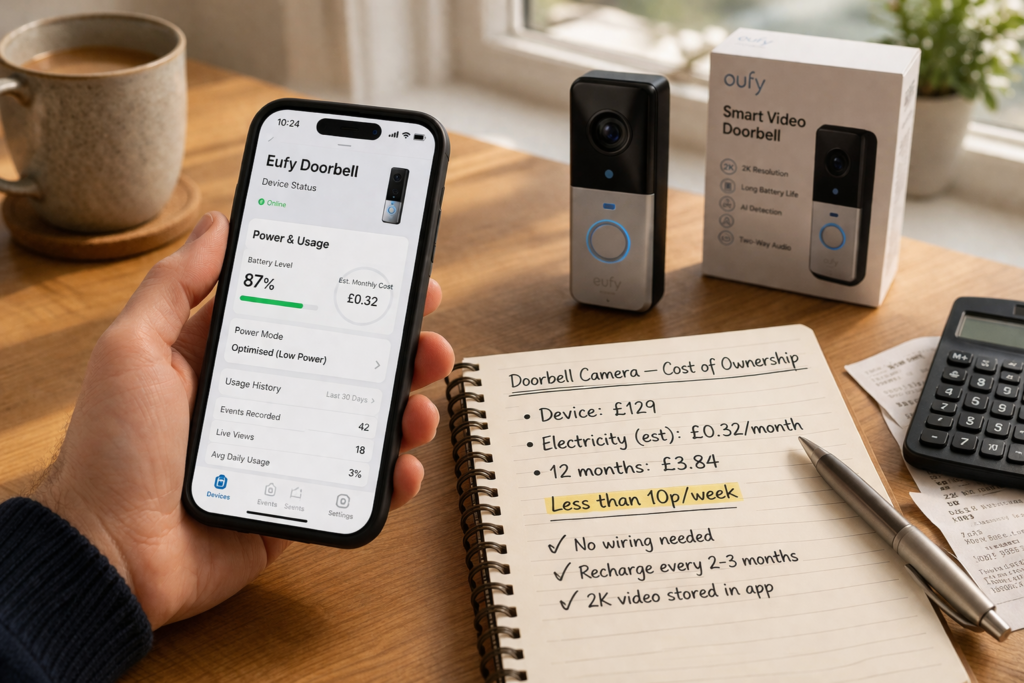
Smart doorbells are low-power devices. A battery-powered model consumes no mains electricity between charges. A wired model typically draws 1–5W continuously — at 24p per kWh, that’s roughly £2–10 per year in electricity. The running cost is not a meaningful consideration on its own.
What makes the calculation interesting is total cost of ownership across several years. A £60 doorbell that saves £30 per year on insurance and costs £5 per year in electricity — plus a subscription of around £30 per year for cloud storage if applicable — produces a net position that looks different depending on which model you choose and how much your insurer adjusts the premium.
With a subscription model like Ring: £60 upfront, £30 cloud storage annually, £5 electricity annually — offset by £30 insurance saving annually. Net cost in year one is £65. Net cost in year two and beyond is £5 per year. That’s worth doing if the insurance saving is confirmed.
Without a subscription like Eufy: £90 upfront for device and base station, £5 electricity annually — offset by £30 insurance saving annually. Net cost in year one is £65. Net cost in year two and beyond is minus £25 per year. That’s a better long-term position if the upfront cost is manageable.
If your insurer offers a smaller discount — say £15 rather than £30 — adjust the calculation accordingly before buying. The point isn’t that one model is universally better value. The point is that the honest calculation is straightforward to do and worth doing before you choose.
If you’re working through the same arithmetic for other smart devices around the home, the smart home upgrades under £50 that actually pay for themselves covers the full picture of which budget smart devices deliver a genuine return and which don’t.
Does Your Insurer Actually Offer a Discount?
Not all do — and the ones that do don’t always advertise it prominently. The practical approach is to call your insurer directly at renewal and ask two specific questions: does installing a smart doorbell affect my premium, and what evidence do you need to apply any reduction?
Some insurers require the device to be from a specific approved list. Others simply need confirmation that a smart security device with motion detection and video recording is installed. Some require professional installation — which rules out battery-powered DIY models for their discount scheme. Knowing the requirements before buying avoids the situation of purchasing a device that doesn’t qualify.
If you’re renting and this is your first step into smart home tech without wanting to drill or rewire anything, the tech gadgets worth considering for renters covers the no-DIY options that work in rented properties across security, energy saving, and home comfort.
If your current insurer offers nothing, it’s worth checking competitors at renewal — some providers actively market security device discounts as a differentiator and the combined saving from switching insurer and declaring a smart doorbell can be more significant than either saving in isolation.
What to Do This Week
The most practical first step is a five-minute phone call to your current insurer before buying anything. Ask whether they recognise smart doorbells as a security upgrade, what their approved list looks like if they have one, and what discount they’d apply. That conversation costs nothing and determines which model is worth buying — or whether the insurance angle changes the economics enough to make switching insurers at renewal more attractive.
If the insurer confirms a discount, the Eufy E340 is the model I’d buy — 2K resolution, no ongoing subscription, and a dual-camera design that covers both face identification and package theft in a single device. If the Ring ecosystem is already in the house or the insurer specifically favours Ring, the Battery Video Doorbell Plus is the simpler choice. If budget is the primary constraint, the Reolink delivers everything an insurer needs at the lowest entry cost.
One conversation this week. One purchase based on what that conversation confirms. That’s the order that makes sense.
FAQ
Does every home insurer in the UK offer a smart doorbell discount?
No — coverage varies significantly. Some UK providers actively offer reductions for verified smart security devices. Others factor it in informally during underwriting without advertising a specific discount. The only reliable way to know is to ask your insurer directly at renewal.
Do I need professional installation for the discount to apply?
It depends on the insurer. Some specify professional installation. Most battery-powered doorbells are designed for DIY installation and many insurers accept this — but confirming before buying avoids disappointment.
Is cloud storage necessary for insurance purposes?
Not strictly — local storage provides footage that’s equally valid as evidence. The practical advantage of cloud storage is that footage survives physical damage or theft of the device itself. If the doorbell is stolen during an incident, locally stored footage goes with it.
Will a smart doorbell increase my electricity bill?
Negligibly for wired models — 1–5W continuous draw costs roughly £2–10 per year at 24p per kWh. Battery-powered models use no mains electricity between charges. The running cost is not a meaningful consideration for most households.
Can I install a smart doorbell in a flat or rented property?
Yes — battery-powered models are designed for exactly this situation. No wiring, no drilling beyond a small surface bracket fixing, and the device is fully removable when you leave. Check with your landlord as a courtesy, particularly if the doorbell will be visible from a shared entrance.
How do I declare a smart doorbell to my insurer?
At renewal, tell your insurer you’ve installed a smart doorbell with motion detection, video recording, and app alerts. Provide the make and model if asked. Some insurers have an approved product list — check whether your chosen model qualifies before buying if the discount is a significant factor in your decision.
Related Guides

About The Author – Andrew Marshall
Andrew Marshall is a Scottish homeowner and the creator of Save Wise Living. He shares practical ways to reduce energy bills, improve home efficiency, and make everyday household routines cheaper and simpler.