
Last Updated: 20th March 2026
Most homes have at least one spot where three or four devices are all plugged in together — a TV unit, a kitchen worktop, a desk — and every single one of them is quietly drawing power long after you’ve gone to bed. Not much individually. Collectively, across a full year, it adds up to a surprisingly meaningful chunk of your electricity bill for devices doing absolutely nothing useful.
Smart extension leads fix that specific problem simply and cheaply. Whether you need one, or whether a smart plug does the same job for less, depends entirely on your setup. Here’s how both work — from someone who has them in two rooms, uses them differently in each, and has learned a few things the hard way along the way.
If you’re working through how to cut standby waste and get better control of your electricity use more broadly, the Smart Energy Monitors & Plugs Hub covers everything from smart plugs to energy monitors and automation ideas that actually reduce bills.
The Standby Problem Is Real — and Most People Underestimate It
A device on standby isn’t using nothing. It’s drawing a small amount continuously — and small amounts across multiple devices, running twenty-four hours a day, three hundred and sixty-five days a year, add up faster than most people expect.
A TV on standby uses around 1-2W. A games console in rest mode can use significantly more — up to 10W depending on the model. A printer, a microwave with a clock, a coffee machine keeping itself warm — none of them draw much individually, but a typical UK living room with four or five devices on standby can easily cost £20-40 per year doing absolutely nothing.
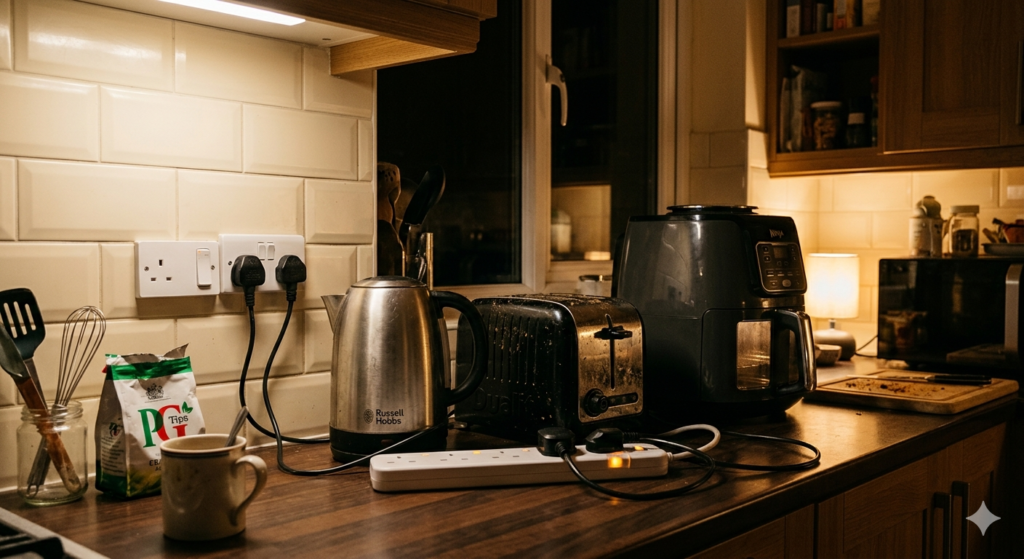
The kitchen is often worse. A kettle, a toaster, a slow cooker, an air fryer — most of these draw zero standby power when switched off at the socket, but few people actually switch them off at the socket every day. They stay plugged in, some with indicator lights running, some just sitting there drawing a trickle that never stops.
In my kitchen I have a smart extension lead running the kettle, toaster, slow cooker, air fryer, and under counter lighting. At night it cuts everything off automatically. I don’t think about it, don’t have to remember to check anything — it just happens. The living room setup does the same for the TV and lamps. Everything off at a set time, every night, without touching a switch.
That’s the whole point of a smart extension lead — not the saving on any single device, but the automation that means you stop leaving things running by accident.
Smart Extension Lead vs Smart Plug — When Each One Makes Sense
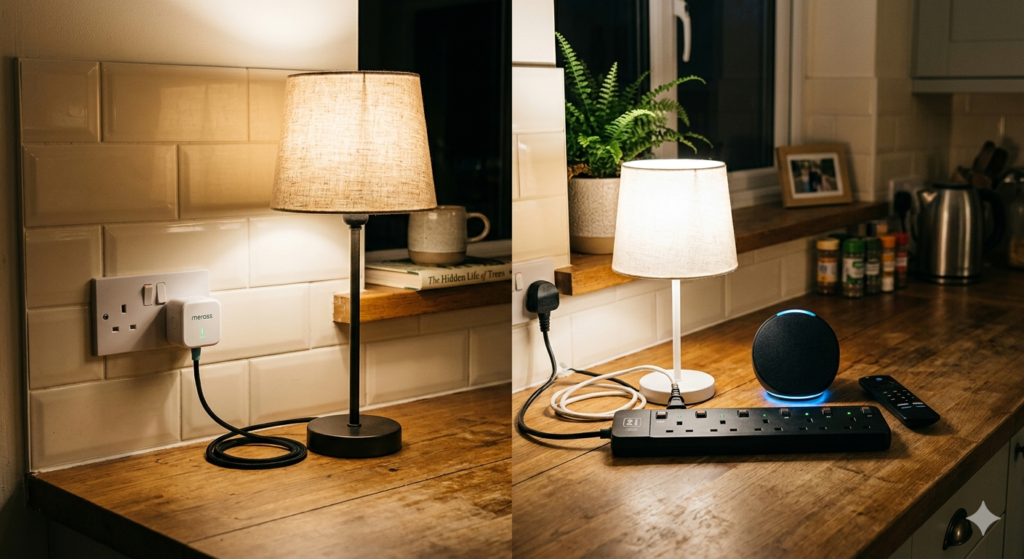
A smart plug controls one device at one socket. It’s the right answer when you have a single appliance you want to control or schedule — a lamp, a fan, a phone charger. I use smart plugs on the hall lamps so they stay on overnight when the kids might wake up needing the toilet. Those plugs are on their own schedule — on at dusk, staying on until morning — completely independent of everything else in the house. A smart extension lead cutting off the living room at midnight doesn’t touch them. That separation is exactly what you want.
A smart extension lead controls a cluster of devices from one point. It’s the right answer when you have three or four things grouped together that you want on the same schedule — a TV unit, a kitchen worktop, a home office desk. One lead handles the whole cluster from a single wall socket instead of four separate plugs taking up four sockets.
The straight version: if everything you want to control is in one place and on one schedule, an extension lead is cleaner and cheaper per device. If you need individual devices on different schedules in different rooms, smart plugs give you the flexibility. Most households end up using both — extension leads for clusters, smart plugs for individual devices that need their own timing. That’s how my setup works and it’s the combination that makes the most sense for a typical UK home.
One Thing Nobody Warns You About Before You Set the Schedule
Before the product recommendations — learn from my mistakes here.
If you’ve got the living room extension lead on a midnight cutoff and you’re deep into Breaking Bad, halfway through a season finale, right at the moment everything comes together — the TV will cut off. Completely. Mid-scene. Because midnight happened and the schedule doesn’t know or care what you’re watching.
Same thing happened during Pirates of the Caribbean. The part where everyone thinks Jack Sparrow is dead. Gone. Screen black. The schedule did exactly what I told it to do.
The fix is simple — if you’re staying up late, change the schedule before you settle in. Most apps let you delay or override a scheduled cutoff in thirty seconds from your phone. But you have to remember to do it before you’re an hour into something and completely engrossed. I learned that the hard way twice.
What the Saving Actually Looks Like
The “up to 10% off your electricity bill” claim that appears on most articles is real in principle but vague in practice. A more grounded way to think about it:
A typical UK household spends around £700-900 per year on electricity at current rates. Standby power and devices left on unnecessarily account for roughly 9-16% of that — somewhere between £70 and £130 per year depending on your setup. A smart extension lead on your TV unit and another on your kitchen worktop, both scheduled to cut off overnight, realistically eliminates a meaningful chunk of that.
The exact saving depends on what you’re switching off and for how long. A TV unit with a console, soundbar, and streaming stick cutting off at midnight instead of running on standby until 7am saves more than a desk lamp and a phone charger. Work out which cluster draws the most overnight and that’s where the extension lead pays back fastest. If you want to see exactly what each device is drawing before you decide, a plug-in power meter takes the guesswork out completely.
At £20-30 for a decent model, the payback on standby saving alone is typically under a year for a TV unit or kitchen cluster. After that it’s pure saving every year.
How to Choose the Right One
A few things genuinely matter when choosing a smart extension lead for a UK home.
Number of sockets and USB ports — most leads offer three or four UK sockets plus USB ports. Choose based on your specific cluster. A kitchen worktop with five appliances needs more than a TV unit with three devices. One spare socket is always useful — don’t buy tight.
Individual socket control — some leads let you control each socket separately from the app. You don’t think you need this until you realise your lamp and TV are on different schedules and you’d rather not cut the lamp off at the same time as the entertainment setup. Worth checking before you buy — not all leads offer it.
Energy monitoring — shows how much power connected devices draw in real time. Genuinely surprising the first time you see what a games console draws on standby overnight — if you want that level of detail across the whole house rather than per socket, a whole-home energy monitor does it from one place.
App and voice assistant compatibility — check which app the lead uses and whether it works with your existing setup. Alexa, Google Assistant, and Apple HomeKit compatibility varies by model. If you’re already in a particular ecosystem, stay in it.
Safety certification — look for surge protected extension leads with BS1363 compliance from a brand with a proper UK track record. A cheap unbranded import that overloads is a fire risk regardless of how smart it is.
The Four Worth Buying
TP-Link Tapo P304M
Three individually controlled sockets with energy monitoring on each one. The Tapo app is reliable, setup is straightforward, and the per-socket energy data is the feature that surprises most people when they first see what their TV unit is drawing overnight. Around £28. Works with Alexa and Google Assistant. The individual socket control is what sets it apart from cheaper options — worth the small premium if your cluster has mixed devices on different schedules.
Meross Smart Power Strip
Four sockets plus four USB ports with full Apple HomeKit compatibility alongside Alexa and Google. HomeKit support on smart extension leads is less common than you’d expect and Meross does it properly. Energy monitoring included. Around £30. If you’re in the Apple ecosystem this is the one to buy without much deliberation.
HBN Smart Extension Lead
Four sockets plus four USB ports, Alexa and Google compatible, surge protection included. No individual socket control and no energy monitoring, but if you just need a cluster on a schedule and don’t need per-device data, the HBN does that reliably for around £25. Right for a kitchen worktop where everything goes off together at the same time.
ANTELA Smart Extension Lead
Three sockets plus three USB ports in a more compact form. Useful for a bedroom or anywhere space is tight — a bedside table cluster or a smaller desk setup. App and voice control, scheduling, around £20. Not the most feature-rich but reliable and unobtrusive for simple setups that don’t need monitoring or individual control.
Room by Room — What Works Where
Kitchen — the highest-value room for a smart extension lead in most homes. A worktop cluster of kettle, toaster, air fryer, slow cooker, and under-counter lighting switched off automatically at night eliminates standby waste from appliances that are used intermittently but plugged in constantly. The HBN suits a kitchen worktop well — straightforward group control, enough sockets, sensible price.
Living room — TV, soundbar, streaming stick, console, lamp. Individual socket control is worth having if you want the lamp on a different schedule to the entertainment setup. The Tapo P304M is the right choice here. And remember what I said earlier — check the schedule before a late night film. Breaking Bad does not pause for a midnight cutoff.
Home office — monitor, printer, laptop charger, desk lamp. Energy monitoring earns its keep here because office equipment varies significantly in standby draw. A printer left on overnight costs more than most people expect. The Tapo P304M again for the monitoring capability.
Bedroom — phone charger, lamp, fan. Simpler setup that doesn’t need individual control or monitoring. The ANTELA is the right size and price for a bedroom cluster.
Hall and landing — this is where smart plugs beat extension leads. Individual lamps on individual schedules — on at dusk, staying on for the kids overnight — need per-device control that a single extension lead can’t give you cleanly. Smart plugs on individual sockets make more sense here and the two setups work well alongside each other.
FAQs
Can I use a smart extension lead with high-wattage appliances like a kettle or air fryer?
Most leads support up to 13A — around 3000W — which covers a kettle or air fryer individually. The issue is running multiple high-wattage appliances simultaneously through the same lead, which can trip the overload protection. In practice a kettle and air fryer rarely run at exactly the same moment. Check the total wattage of your cluster before buying.
Do I need Wi-Fi?
Yes — most smart leads need a 2.4GHz Wi-Fi connection. No separate hub needed. If your Wi-Fi drops, manual control still works at the lead itself and most schedules continue running from cached settings.
Is setup complicated?
No. Most leads pair via QR code scan in the app. Two to five minutes for anyone comfortable with a smartphone. The Tapo and Meross apps are both clean and well designed.
What’s the difference between individual socket control and group control?
Group control switches all sockets on or off together — right when you want the whole cluster on one schedule. Individual control lets you set different schedules per socket — right when your cluster has a mix of devices with different needs. Worth the small premium if your setup is mixed.
Can I use them in rental properties?
Yes — smart extension leads plug into existing sockets without any modification to the property. No landlord permission needed.
What about the schedule cutting off mid-programme?
Check your cutoff time before settling in for a late one. Thirty seconds in the app to delay or override the schedule is all it takes — I learned that the hard way during Breaking Bad and Pirates of the Caribbean, at the worst possible moments in both. For the full breakdown on scheduling and getting the most from your setup, smart plug scheduling is worth reading before you configure anything.
The Honest Call
Smart extension leads are one of those purchases that costs less than expected and saves more than assumed — particularly if you have a kitchen worktop or TV unit drawing standby power every night without you thinking about it.
The kitchen cluster is where I notice the saving most clearly. Everything off automatically, no checking, no remembering. The living room does the same. The hall lamps stay on because the smart plugs there run their own separate schedule — that’s the combination that actually works rather than trying to force one solution across every situation in the house.
For a cluster of devices in one place — kitchen, TV unit, home office — a smart extension lead at £20-30 is the right tool. For individual devices on different schedules, smart plugs. Most homes need both and they work better together than either does alone.
Just remember to check the schedule before Breaking Bad.
For more on cutting standby waste and controlling electricity use around the house, the Smart Energy Monitors & Plugs Hub covers smart plugs, energy monitors, and automation setups that actually work.
Related Guides

About The Author – Andrew Marshall
Andrew Marshall is a Scottish homeowner and the creator of Save Wise Living. He shares practical ways to reduce energy bills, improve home efficiency, and make everyday household routines cheaper and simpler.